
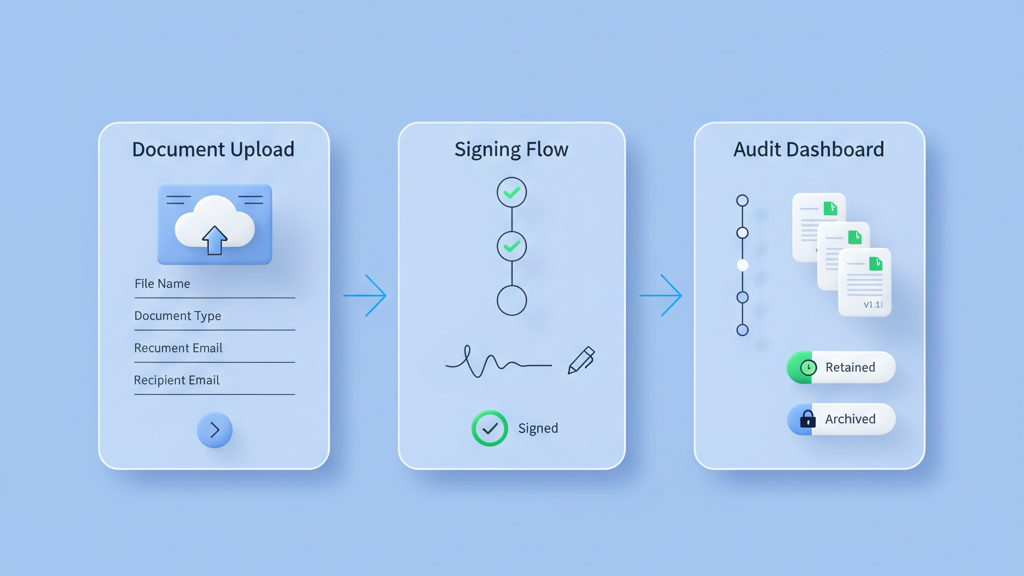
This guide shows how to plan legal tech application MVP compliance and document flows for a fast but safe launch in the USA. I focus on practical steps that founders and product managers can take to reduce legal risk without slowing learning. The aim is to keep the MVP small while proving core document journeys and consent mechanics. You will get clear advice on mapping flows, minimal data models, audit trails, tests, and monitoring. Many startups miss these pieces and then face costly rewrites. Read this as a playbook to ship quicker and stay defensible. If you want a related deep dive, read Practical Product Steps For Founders: how to plan MVP features for startup founders.
Why Prioritize Compliance Early
Compliance cannot live as an afterthought. Startups often push legal work to the end and then face costly rewrites. Build basic compliance checks into your MVP plan from day one. That means mapping which laws apply in the USA and which user actions trigger obligations. Include privacy, data retention, e signatures, and consumer protection rules where relevant. Work with a lawyer or use vetted templates for clauses and consent flows. Many founders miss this and think they can fix it later. That usually slows product launches and scares investors. Think of compliance as a user safety layer not a blocker. This mindset keeps scope tight and avoids rework. Prioritize the minimum viable controls that reduce legal risk while allowing you to learn from real customers. Set clear success criteria for these controls so you can remove or strengthen them based on usage data. For a practical follow-up, see What Customers Really Want: Decoding User Feedback for MVP Success.
- List applicable US regulations
- Identify risk trigger actions
- Draft minimal consent text
- Set retention limits
- Plan legal review checkpoints
Map Document Flows Before You Code
Map document flows before writing code. A clear flow shows where documents are created, stored, signed, and archived. It exposes touch points that need consent, redaction, or access controls. Use simple diagrams that show users, services, and data stores. Keep the flow minimal so you can test assumptions quickly. Prototype one common document journey end to end before automating others. This is not glamorous work but it saves deep refactors later. Include failure modes in the map because many real world problems come from partial saves and retries. Test how the flow behaves when users close a browser or when a signature expires. That reveals hidden continuity and security needs. Many teams skip this step and then rebuild storage and retention logic after launch. If you need implementation support, explore MVP development for startups.
- Draw end to end document journeys
- Mark consent and redaction points
- Define storage and access rules
- Include error and retry scenarios
Designing Minimal Yet Compliant Data Models
Design minimal data models that support compliance needs. Capture only fields you must keep for legal reasons. Excess data increases risk and storage costs. Model documents as objects with metadata for version, signer id, timestamps, and retention policy. Avoid embedding sensitive fields in searchable indexes. Use token references for external storage when possible. Plan schema migrations carefully because changing document schemas can invalidate audit trails. Keep the model readable and documented for legal reviewers and auditors. I recommend building a clear separation between document content and legal metadata. That simplifies redaction and archival. Many teams overengineer schemas early. Start simple and plan to extend based on real usage.
- Limit stored fields
- Separate content from metadata
- Add version and retention tags
- Use references for large files
- Document schema decisions
User Flows And Consent Capture
Consent capture is a UX problem and a compliance problem. Design flows that make the action and consent clear. Use checkboxes only when they add clarity not to force acceptance. Record consent timestamps and the exact text shown to users. Store consent as immutable records linked to each document event. For mobile and embedded screens ensure the flow works with small viewports and slow networks. Consider progressive disclosure where you show a short summary and an expanded explanation. Test with real users to avoid dark patterns. My opinion is that clear consent increases trust and reduces disputes. Many founders underestimate the effort to show proof of consent during a support case. The extra work upfront pays off in better retention and fewer legal headaches. A related guide worth reviewing is Real-Life Case Studies: The Power of MVP Development for Startups.
- Record consent timestamps
- Link consent to document events
- Avoid dark patterns
- Test on mobile
- Store consent snapshots
Automated Audit Trails And Logging
Automated audit trails are the backbone of compliant document systems. Build immutable logs that capture who did what and when. Include event type, actor id, IP address when available, and the document version affected. Design the logs so auditors can reconstruct the full history without accessing raw content. Consider hashing documents and storing the hash in the audit record to prove integrity. Keep retention and export functions simple for legal discovery. Plan for log growth and design a purge policy that aligns with retention rules. Also think about access controls for audit data. Not everyone should read full logs. Many teams think logs are optional until a regulator asks for them. That is a mistake that is costly to fix.
- Capture event type and actor
- Store document hashes
- Limit access to logs
- Plan retention and export
- Include IP and agent details
Testing Strategy For Compliance And Edge Cases
Testing for compliance is not just functional testing. Add scenario tests for edge cases like failed signatures, partial uploads, and expired consents. Automate tests that verify retention and deletion rules. Include integration tests that simulate data export for legal discovery. Run load tests on signing flows to see how timeouts affect state. Use synthetic audits where you reconstruct document histories and verify integrity. Include a legal review step in your release checklist so changes to data handling get a quick sanity check. Consider using feature flags to roll out changes and monitor impacts. A warning here is that test coverage is only valuable if you run the tests often. Many teams write tests and then forget them.
- Automate edge case scenarios
- Add integration export tests
- Run signing load tests
- Use feature flags
- Include legal review in releases
Launch Monitoring And Iteration Plan
Launch with monitoring that focuses on compliance signals. Track failed signature rates, consent rejections, and unexpected retention events. Build alerts for spikes that indicate a systemic problem. Offer easy export and reporting tools for legal and support teams so they can act quickly. Keep a roadmap item list for compliance related items and prioritize based on risk not vanity metrics. Iterate on document flows based on real world support cases and legal feedback. Plan small releases that fix the highest risk items first. It is tempting to add features instead of shoring up compliance. My advice is to stabilize the core flows first. This will make scaling safer and faster and it will reduce painful rewrites later. Teams moving from strategy to execution can review Software maintenance and scaling.
- Monitor signature failures
- Alert on retention anomalies
- Provide export tools
- Prioritize risk driven fixes
- Iterate from support cases