
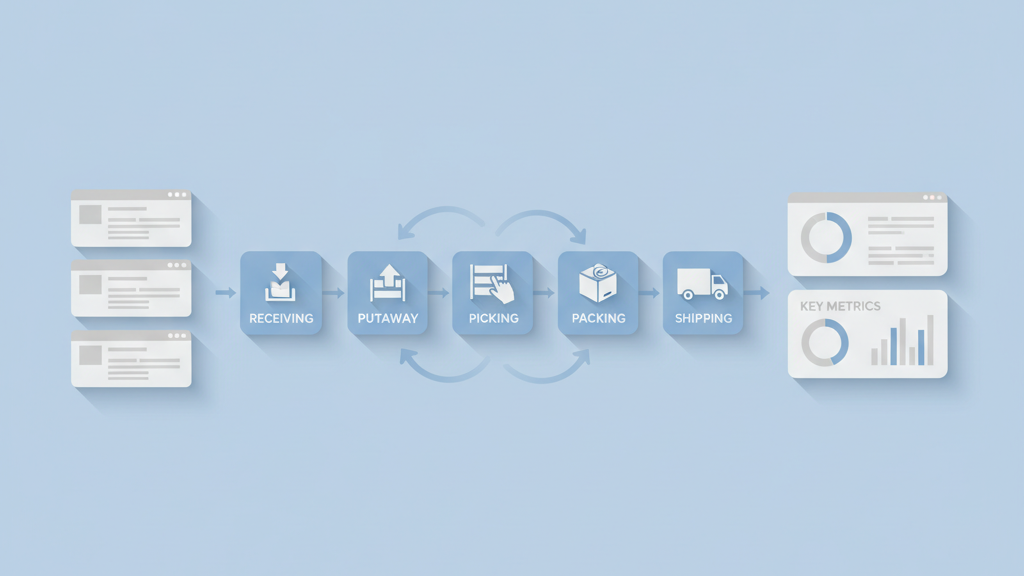
This guide walks founders and product managers through inventory management software MVP warehouse process mapping in a clear and practical way. Startups often jump to features and miss simple flow problems. Mapping helps you spot handoffs, data gaps, and slow steps before you build. I prefer starting with paper or a whiteboard and a stopwatch. Test actual staff with a rough map and adjust the plan. Many startups miss this step and waste weeks on rework. This intro will help you focus on what matters for a fast MVP, and it will show how to keep scope tight while preserving future scalability. If you want a related deep dive, read Building an Analytics Dashboard Software MVP for Product Managers: A Practical Guide.
Map Core Warehouse Flows
Start by mapping the work that matters most for day to day operations. Walk the warehouse and watch staff move items from receiving to storage, then to picking and packing. Note every manual step and every decision point. Include where mistakes happen and where multiple hands touch the same item. A clear map should expose bottlenecks that add time or errors. Keep the first map high level so you can test it quickly. This will help you decide which flows belong in the MVP and which can wait. Many teams skip this and then discover they automated the wrong thing. A simple map saves time and money.
- Observe actual staff doing the work
- Record handoffs and decision points
- Highlight frequent error sources
- Keep the first map high level
- Mark steps that block throughput
Prioritize Minimal Features
Turn the map into a short feature list that solves the biggest pain points. Focus on features that reduce errors and speed up the flow. For many warehouses this means accurate receiving, basic location management, and fast picking screens. Avoid nice to have reports or complex analytics in the first release. Prioritize features that improve throughput or cut rework. Use a simple scoring method that accounts for impact and build complexity. Be honest about unknowns and keep the scope tight. Startups often try to pack too much into an MVP. A lean feature set helps you validate assumptions faster and get real feedback. For a practical follow-up, see Steps to Create a Lean Prototype for Startups That Validate Fast.
- Rank features by impact on errors
- Score features by build complexity
- Limit initial scope to core flows
- Defer reports and analytics
- Choose features that enable testing
Design A Lean Data Model
Design a simple data model that supports the MVP flows without over engineering. Model items, locations, transactions, and users. Avoid adding complex inventory states or historical tables until you need them. Keep identifiers stable and small so integrations remain simple. Think about eventual scale but do not prebuild every field. A lean model speeds development and reduces integration risk. Include only fields that drive screens or rules. Poor data design is a common silent killer of early products. A pragmatic model helps you iterate quickly while keeping migration paths clear for the next phase. If you need implementation support, explore MVP development for startups.
- Model items, locations, transactions, users
- Keep fields to those that drive screens
- Use stable compact identifiers
- Avoid premature historical tables
- Plan a clear migration path
Build Simple Picking And Receiving Screens
Create fast and focused screens that guide staff through picking and receiving. Use large touch targets and clear next actions. Minimize typing by relying on scans or simple selections. Show only the data needed for the task. For receiving include expected quantities and an easy way to flag discrepancies. For picking show location, quantity, and a confirmation step. Avoid complex search or filter options in the first release. Test these screens with actual users and watch for hesitation. Small UI changes often yield big productivity gains. A pragmatic interface design beats feature rich screens on day one.
- Prioritize scan first interactions
- Show only task relevant data
- Use clear confirmation steps
- Avoid complex search features
- Test screens with real staff
Defer Heavy Integrations
Integrations can add risk and delay. For the MVP focus on simple exports or lightweight webhooks. Use manual processes for edge cases so you can test core flows first. Keep third party dependencies optional. If a customer needs a full ERP integration later, design a clean API layer now. Many teams build deep integrations too early and then struggle to change the core data model. A pragmatic approach lets you prove the business case before you invest heavily. You can signal integration readiness without delivering the full connector in the first build. Teams moving from strategy to execution can review Backend API development.
- Start with exports and webhooks
- Keep integrations optional at launch
- Use manual workarounds for edge cases
- Design a clean API layer early
- Prioritize reliability over completeness
Validate With Staff And Small Batches
Run pilots with a small number of SKUs and a few staff members. This reveals practical issues that maps miss. Time each step and compare against the original map. Watch for hidden work like searching for items or fixing miscounts. Collect qualitative feedback after each shift. Be ready to change screens and flows based on what you learn. Pilots help you measure real value and build confidence with early customers. A cautious approach during validation prevents big mistakes. Few things save time like watching someone use your product in a real warehouse. A related guide worth reviewing is A Practical Process for Iterating Product Features Based on Feedback.
- Pilot with small SKU sets
- Time and compare each step
- Collect qualitative feedback
- Adjust flows quickly
- Document issues for next iteration
Measure Key Metrics And Iterate
Choose a few metrics that show progress and focus on them. Good metrics include pick rate per hour, receiving accuracy, and average time to ship. Track these before and after changes so you can prove impact. Use simple dashboards and avoid vanity metrics. Set short iteration cycles to tweak UI, rules, or data handling. Keep stakeholders informed with clear before and after numbers. Iteration based on measurement keeps the team aligned and reduces wasted work. My opinion is that teams who measure early build better products faster. Many startups under invest in simple measurement.
- Track pick rate and accuracy
- Measure time to complete core flows
- Use simple dashboards for clarity
- Run short iteration cycles
- Share before and after results