
Starting a booking platform requires more than just a calendar interface. It needs a solid technical foundation to handle real time data and user demands. This guide covers how to approach FlutterFlow booking platform app MVP development and technical strategy for modern startups looking to launch quickly.
Database Architecture and Time Management
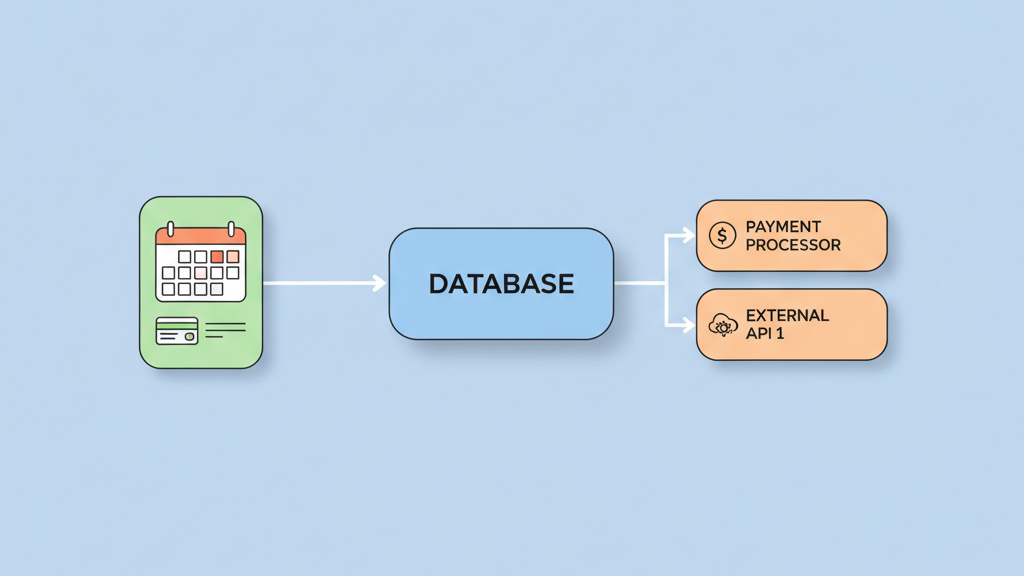
Building a booking system is hard because it requires real time updates. You need to manage availability carefully to avoid double bookings which frustrate users. Using FlutterFlow for this helps speed up the process of building the frontend. However, many startups miss the complexity of time zone management during the initial build. If your backend does not handle UTC offsets correctly, your users will see wrong times for their appointments. We suggest using Supabase or Firebase as your primary database because they are scalable and reliable. These tools sync well with the FlutterFlow environment. This setup allows for a robust FlutterFlow booking platform app MVP development and technical strategy that can scale as you grow. You should focus on how data flows between the user and the server to ensure high performance. A common mistake is putting too much logic on the client side of the application. This makes the app slow and prone to errors on older devices. Keep your business logic in cloud functions where possible to maintain speed. This keeps the application light and fast for everyone. You also need to think about how you handle different user roles such as service providers and customers. Each role needs a specific set of permissions and views. Managing these roles correctly from the start prevents security issues later. A clear data model is the first step toward a successful launch.
Essential API Integrations for Service Apps
Payments and notifications are the heart of any service platform. You cannot have a functional booking app without a way to take money from customers securely. Stripe is the best choice for most US based startups due to its flexibility. It has great support for escrow and split payments which is useful if you run a marketplace. You also need a way to remind users of their appointments to reduce no show rates. SMS notifications via Twilio work better than emails for high attendance because they are read faster. Many founders forget that API costs can add up quickly as you scale. It is better to batch your requests when possible to keep costs down. You should also think about how you handle failed transactions or expired sessions. A smooth refund process is just as important as the booking itself for customer trust. These technical choices define your long term success and user retention. You might also want to integrate with external calendars like Google or Outlook. This allows users to see their bookings alongside their daily tasks. Implementing a webhook system is the best way to handle these updates in real time. This ensures that your app stays in sync with the outside world at all times.
- Stripe Connect for marketplace payments
- Twilio for automated SMS reminders
- SendGrid for formal receipts
- Google Calendar API for syncing schedules
- Firebase Cloud Messaging for push alerts
Optimizing User Experience and Conversion
User experience is where most booking apps win or lose in a competitive market. The flow must be friction free from the moment a user opens the app. Users should reach the payment screen in less than four clicks to maximize conversion rates. We often see apps that ask for too much information upfront which leads to high bounce rates. You should let users browse services before they have to create an account. FlutterFlow allows you to build these complex flows visually using its logic builder. It is a powerful tool for FlutterFlow booking platform app MVP development and technical strategy because you can iterate fast based on feedback. Do not spend months on a perfect design before launching. Get the core booking loop working and test it with real people in your target market. Their feedback is more valuable than your internal assumptions about what they want. Small details like loading states and error messages matter a lot for the overall feel. If a user clicks a button and nothing happens, they will think the app is broken. Always provide visual feedback for every action including subtle animations or haptic feedback. This makes the app feel more professional and responsive. You should also ensure the app works well on different screen sizes since users will book on both phones and tablets.
Performance Tuning and Custom Code
Performance is not just about raw speed but about perceived speed and reliability under load. FlutterFlow generates clean code for the most part, but you still need to optimize your assets. Large images will slow down your app and eat up user data. Use cached network images to keep things snappy and reduce loading times. You might also need custom code for complex calendar logic that goes beyond standard features. While the built in components are great, sometimes a custom widget is necessary for a unique feature. This is where a professional technical strategy makes a difference in the quality of the final product. You should also monitor your app performance using tools like Sentry or Firebase Performance Monitoring. It helps you find bugs and bottlenecks before your users do. Many developers overlook the importance of efficient database queries. If you fetch too much data at once, the app will lag. Always use pagination for lists and filter data on the server side. This keeps the frontend responsive even when you have thousands of records. These optimizations ensure that your application remains usable as your user base grows over time.
- Use FlutterFlow custom actions for complex logic
- Implement local state for immediate UI feedback
- Optimize image sizes before uploading to storage
- Use lazy loading for long lists of services
- Enable offline caching for better reliability
Testing and Scaling for Growth
Launching is just the beginning of the journey for any software product. You need a plan for maintenance and scaling after the initial MVP is live. Many teams launch and then realize they cannot handle a thousand concurrent users. You should stress test your database queries early in the development cycle. Make sure your indexes are set up correctly in your database to avoid slow search results. This avoids slow search results as your data grows and becomes more complex. Security is another area where people cut corners to save time. Ensure your database rules are strict and your API keys are hidden from the public. A leak can be fatal for a small startup and ruin your reputation. This final stage of FlutterFlow booking platform app MVP development and technical strategy ensures your product is ready for the real world. Take the time to do it right before you start spending money on marketing. You should also have a plan for user support and bug reporting. When users find a problem, they need a clear way to tell you so you can fix it. Regular updates show your users that you are committed to improving the service and building a reliable platform.
Leveraging Analytics for Strategy
Data is your most valuable asset when trying to grow a new platform. You need to know how users are interacting with your booking flow. Integrating a tool like PostHog or Mixpanel gives you deep insights into user behavior. You can see where users drop off and what features they use the most. This information is vital for making informed decisions about future updates. Many startups collect data but never look at it. You should set up a dashboard that tracks your key performance indicators every day. This helps you stay focused on growth and user satisfaction. FlutterFlow makes it easy to add tracking events to your buttons and navigation. You do not need to write complex code to get these insights. However, you must be careful about user privacy and data protection laws. Make sure you have a clear privacy policy and that you only collect what you need. This builds trust with your audience and keeps you compliant with regulations like GDPR or CCPA. Strategic data usage is what separates successful apps from those that fail within the first year.