
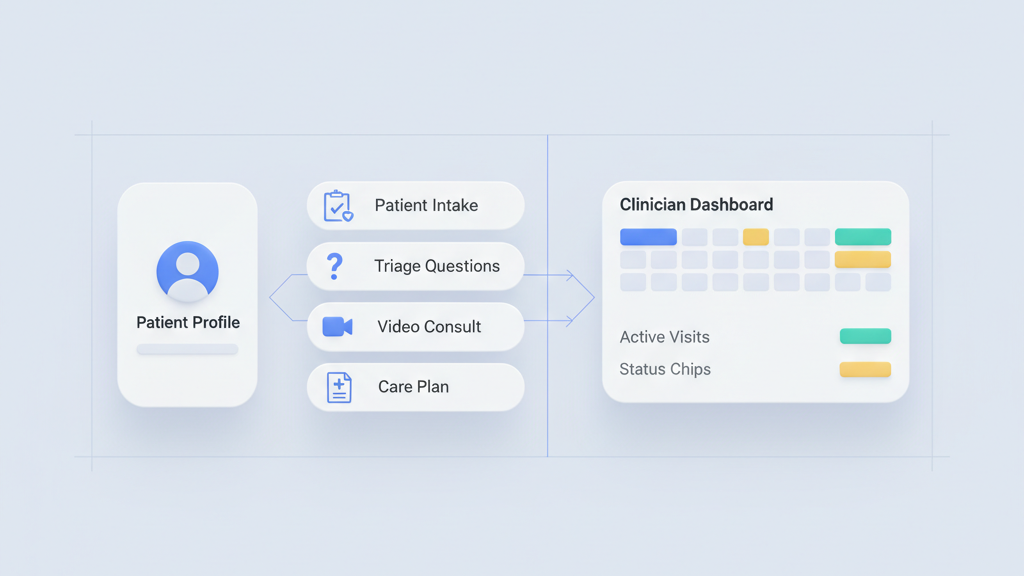
Startups and product leaders need a tight plan when they build a telemedicine application MVP for urgent care workflows. This guide focuses on essential features, lean engineering, and realistic compliance expectations. Many founders miss how small UX choices affect adoption. Read on for priorities that keep scope small and value high. If you want a related deep dive, read Practical Product Steps For Founders: how to plan MVP features for startup founders.
Start With The Core Problem
Urgent care telemedicine is not about adding video to scheduling. It is about resolving common acute complaints quickly and safely. For an MVP you must pick a small set of conditions and build workflows that get patients from intake to resolution in one interaction when possible. Focus on triage accuracy, clinician efficiency, and safe referral paths. Many startups miss this and build generic tools that need more scope to show value. Decide what success looks like in measurable terms. That could be time to treatment, percentage of visits resolved without escalation, or follow up adherence. These metrics will guide product choices and engineering trade offs during the first three months of development. For a practical follow-up, see How To Set Product Metrics And KPIs For Startups That Scale.
- Define 3 to 6 target complaints
- Set measurable success metrics
- Map the end to end patient path
- Avoid features that do not improve resolution rates
Essential Feature Set For The MVP
Keep features tight and focused on clinical outcomes. The minimum viable set should include rapid intake with symptom guided questions, secure video, clinician notes with templates, prescription routing, and a clear escalation flow to in person care. Add asynchronous messaging only if it reduces visit time. Integrations matter but start with one electronic prescribing partner and one identity provider. Make sure the intake collects the data clinicians need without wasting patient time. A single streamlined flow improves conversion. In my view it is better to do fewer features well than to ship many half finished components. Build with testing hooks so you can measure drop off and iterate fast. If you need implementation support, explore MVP development for startups.
- Implement symptom guided intake
- Ship secure video with recording flags
- Provide clinician templates
- Integrate one e prescribing partner
- Include a clear escalation flow
Designing Urgent Care Workflows
Workflow design determines whether clinicians can handle high volume without burnout. For urgent care you need fast triage, triage to video or chat routing, and shortcuted documentation that still supports billing and safety. Use role based screens that hide irrelevant fields. Offer smart defaults and conditional questions to cut clicks. Add safety checks for red flags and an easy path to schedule in person care. Test the flow with clinicians early and iterate on small fixes. Expect to change the order of questions after real visits. A warning for founders is that clinicians will resist systems that increase friction even if the data looks useful on paper.
- Use role based interfaces
- Provide conditional question flows
- Add red flag safety checks
- Optimize for minimal documentation clicks
Technical Architecture And Integrations
Choose a modular architecture that separates UI, clinical logic, and integrations. Serverless components can speed development but pick durable data storage for visit records. Plan APIs for patient identity, e prescribing, video, and billing. Start with a single database and avoid premature distribution. Secure data in transit and at rest. For the MVP integrate with one EHR lightly using read and write hooks only where required. Use feature flags to toggle new integrations. My opinion is that simple, well documented APIs and a small number of reliable partners beat a long list of shallow connections every time. Teams moving from strategy to execution can review Backend API development.
- Separate UI, logic, and integrations
- Use one reliable database
- Integrate one EHR endpoint
- Protect data at rest and in transit
- Use feature flags for rollout
Compliance, Security, And Risk Management
Regulatory and privacy work can slow a launch but they are non negotiable. Implement access controls, audit logs, and encryption early. Build consent flows that match clinical practice and document proof of consent. For US urgent care you must follow HIPAA requirements and be ready to show risk assessments and vendor contracts. Train clinicians on secure usage patterns and run penetration tests before wider rollout. Many startups underestimate the documentation audit trail needed for compliance reviews. Investing in these controls up front reduces friction with payers and partners later on. A related guide worth reviewing is Legal Tech Application MVP Compliance And Document Flows For Startups.
- Enable role based access controls
- Keep detailed audit logs
- Document risk assessments
- Run penetration testing
- Prepare vendor and BA agreements
Launch Strategy And Iteration Plan
A staged launch reduces risk and gives better feedback. Start with a closed pilot in a single clinic or partner network. Measure conversion, resolution rate, clinician time per visit, and patient satisfaction. Use qualitative interviews to learn edge cases that analytics miss. Roll features out by hypothesis and measure impact with A B tests when possible. Have a clear rollback plan for integrations that fail. Iterate weekly on high priority fixes and monthly on larger UX improvements. Startup founders should expect the first three months to be heavy on process changes and training. That is normal and often a sign that the product is finding real clinical fit.
- Run a closed pilot first
- Track clinician time and resolution rates
- Use qualitative interviews
- Run A B tests for major changes
- Plan for weekly iteration cycles